

ContentsTap to jump to a section+
- 01Opening a PSD does not mean its fonts are available
- 02Start with a real PSD and retain the original
- 03Step 1: open the PSD with File → Open…
- 04Step 2: check that the layers remain separate
- 05Step 3: treat missing-font warnings as actionable
- 06Does the Type toolbar prove which fonts are used?
- 07Step 4: save a separate PSD
- 08Step 5: reopen the actual download
- 09Be Vietnam Pro Regular is now in public PhotoCraft
- 10Edit Vietnamese text in a PSD with the added font
- 11Save the PSD and load the font before reopening in a new session
- 12Public-build results after saving and reopening the PSD
- 13Why can a publicly available font still produce a warning?
- 14Before using a PSD for production work
- Be Vietnam Pro Regular is available in public PhotoCraft, still using application version 0.15.1.
- Vietnamese text at 22 pt retained its content, layers and position after saving and reopening in a new session.
- Before/after PNGs matched pixel for pixel; font substitution can still change text width.
- Select Be Vietnam Pro to load it before opening a PSD in a new session; a catalog name is not proof it is loaded.
Opening a PSD does not mean its fonts are available
PhotoCraft opened a real layered PSD in Friday Works’ test on 25 October 2026. After saving and reopening it, the 384 × 64-pixel sample retained two layers, its text and four font references. The application also reported that all four fonts were missing in the test environment.
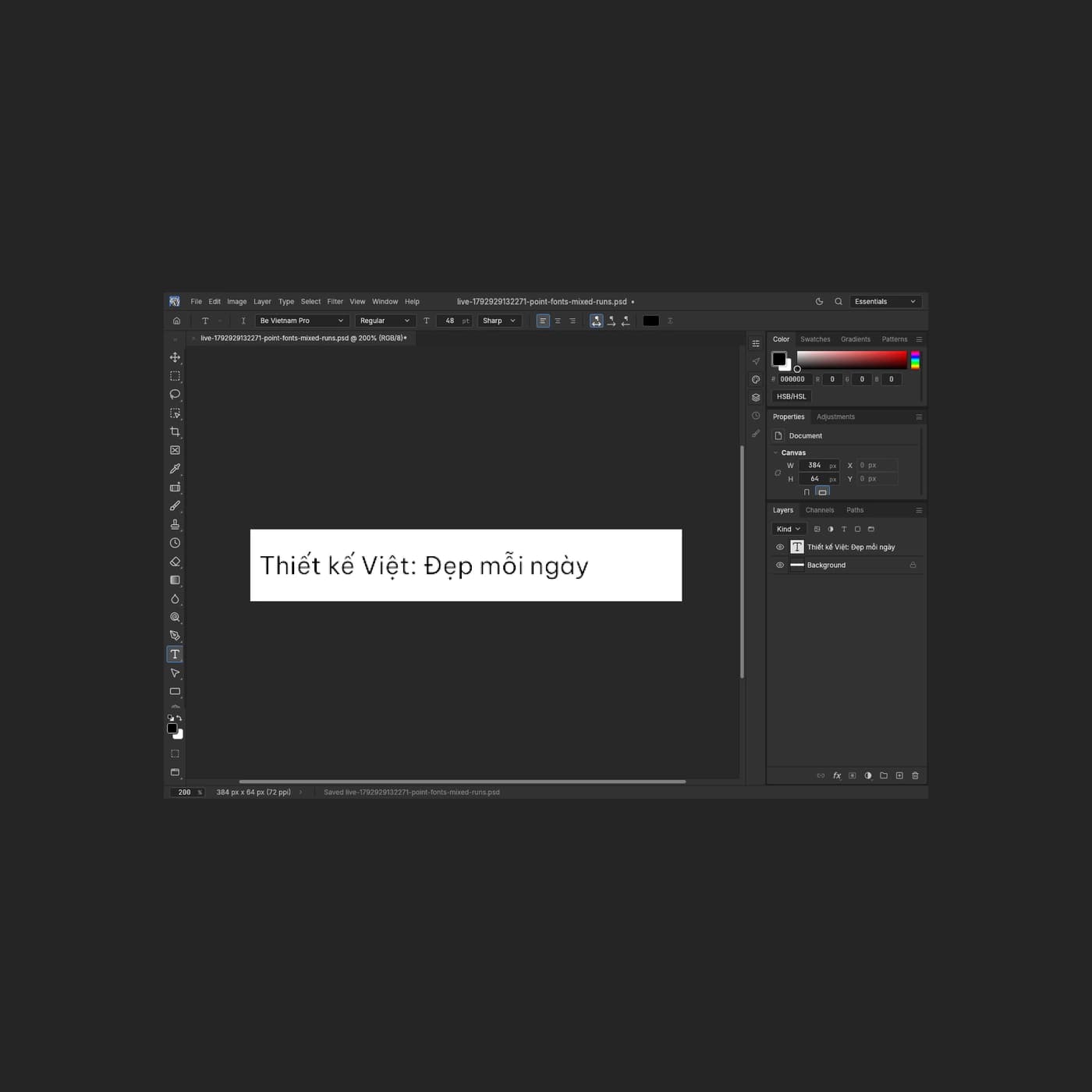
Updated 25 October 2026: Be Vietnam Pro Regular is now available in Friday Works’ public PhotoCraft. Friday Works selected the font, edited “Thiết kế Việt: Đẹp mỗi ngày”, saved the PSD and reopened it in a new session. The sentence and position were retained, with pixel-identical before/after PNGs for this single-line 22 pt sample. The additional workflow images below were recaptured on the public build after deployment.
The useful sequence is to open a copy, inspect the layers, read font warnings, save a separate PSD and reopen that actual download. Resolve font availability before relying on a document for text editing or client handoff.
Start with a real PSD and retain the original
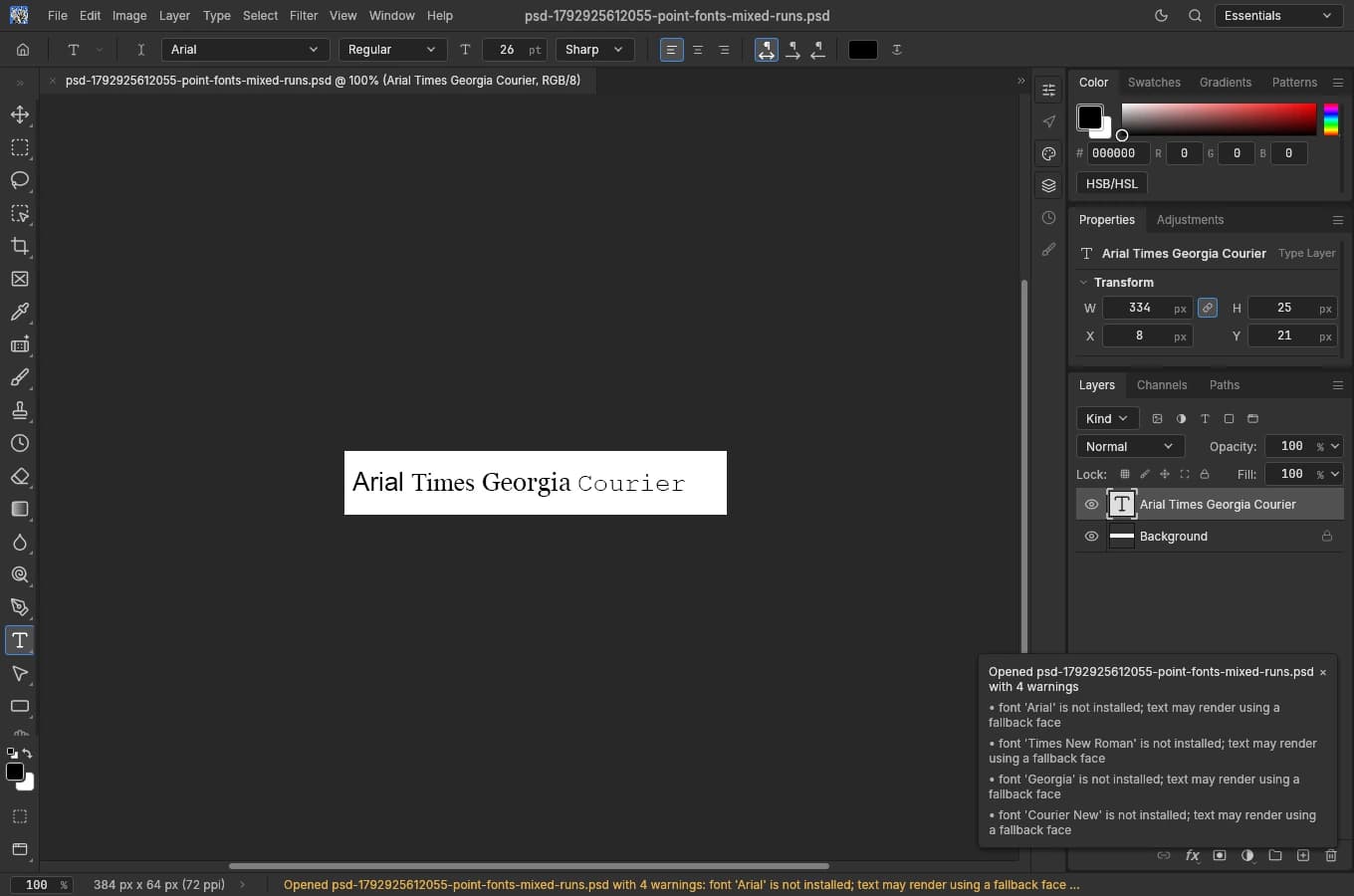
Friday Works used point-fonts-mixed-runs.psd from PhotoCraft’s official test corpus. Its provenance identifies it as a Photoshop-authored sample with a white background and an editable text layer reading “Arial Times Georgia Courier”. The original sample content is available under MIT or Apache-2.0; it is not a customer document.
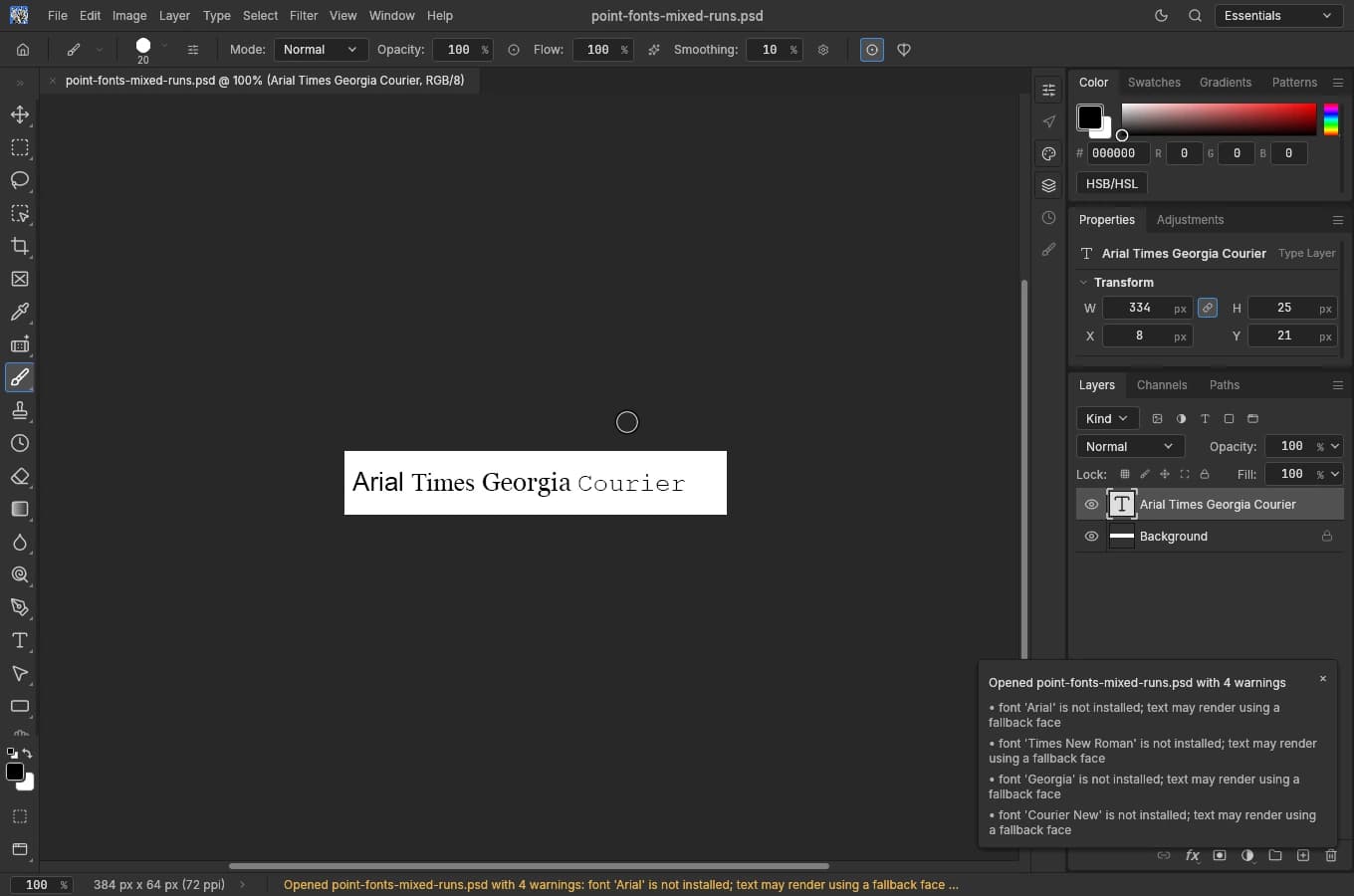
A layer is a separate piece of document content that can be selected or hidden independently. Here, Background is the raster background, while the layer with the T thumbnail contains type. Four text runs reference Arial, Times New Roman, Georgia and Courier New.
Copy your working file before opening it. For a designer’s PSD, also request an approved PNG or JPEG for visual comparison, a font list and the necessary font-use rights. An apparently correct preview is insufficient reason to overwrite the only original.
Step 1: open the PSD with File → Open…
Open PhotoCraft, wait for the editor and choose File → Open… from the menu. Select the .psd file on your computer and wait for its document tab. Friday Works used the browser’s actual file chooser for this test.
Check the document name, its dimensions in the status bar and the canvas. The sample opened at 384 × 64 px and 100% zoom. Zoom changes the view rather than the document’s pixel dimensions.
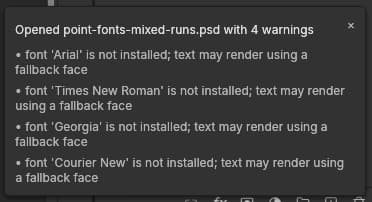
Read the opening notification before dismissing it. PhotoCraft displayed four font warnings for this file. Closing that notification makes room for the Layers panel; it does not resolve the underlying warnings.
Step 2: check that the layers remain separate
Find Layers on the right. Count the layers and inspect their names and visibility before editing. The sample contains Arial Times Georgia Courier above Background; the downloaded PSD was independently checked for the same names and order.
Click the eye beside the type layer to hide it. In the test, the lettering disappeared while the white background remained. Clicking again restored the text. This small check establishes that the text and background are not merely one flattened image.
Select the type-layer row and inspect Properties: PhotoCraft identifies it as a Type Layer. Avoid flattening or rasterizing text merely to suppress a warning if editable type is required.
Restore the intended visibility before saving. A document’s asterisk or dot can indicate unsaved changes after a visibility toggle even when the text itself was not edited.

Step 3: treat missing-font warnings as actionable
PhotoCraft reported Arial, Times New Roman, Georgia and Courier New as not installed in the test environment, with a warning that text may use a fallback face. Retain that information when deciding whether the file is ready for handoff, even if its opening appearance seems correct.
A PSD can contain a previously saved merged composite for displaying its appearance. That image and the stored font names do not establish that the application has the fonts needed to render edited text. The sample corpus explicitly distinguishes its composites from rendering type with the matching fonts installed.
Record the missing names and request properly licensed fonts from the designer. If PhotoCraft still cannot access the intended fonts, pause text editing or agree on a substitute and approve the layout again. Do not assume an arbitrary font download is licensed for the job.
Does the Type toolbar prove which fonts are used?
Select the text layer, then select the T tool on the left. The test toolbar showed Arial, Regular and 26 pt. However, this particular layer contains multiple fonts in one line, so a single toolbar field cannot describe every text run.
An independent PSD reader identified ArialMT, TimesNewRomanPSMT, Georgia and CourierNewPSMT in the source. Those are stored font identifiers, not proof that the fonts are loaded. The initial pass did not replace text; the additional tests below changed the font and typed a Vietnamese sentence in the actual editor.

Step 4: save a separate PSD
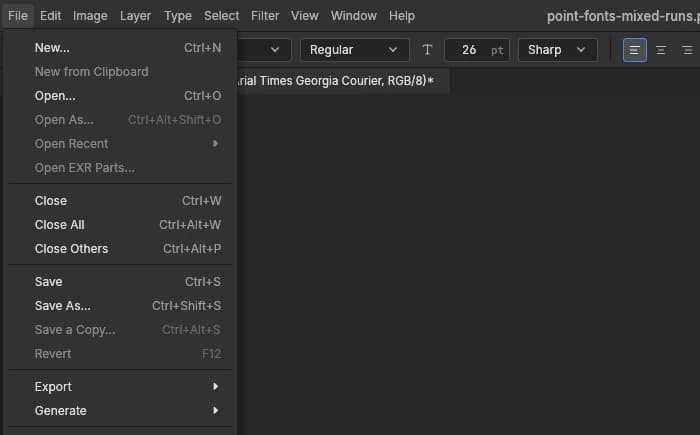
After restoring the intended layer visibility, choose File → Save As…. In the Chrome environment used here, that action downloaded point-fonts-mixed-runs.psd directly; it did not open another format-selection dialog.
Check the Downloads folder, download time and .psd extension. Rename the downloaded copy in your file manager if necessary, for example design-checked.psd, and retain the source elsewhere. Browser download settings may cause a location prompt on your computer.
The actual downloaded PSD was 65,762 bytes. Friday Works checked its PSD format signature rather than trusting its filename alone. A different byte count from the source does not by itself establish either corruption or complete preservation.
PNG and JPEG are useful viewing or delivery formats, but neither replaces a layered PSD working copy. Retain the PSD when exporting an image, and validate the exported image separately.
Step 5: reopen the actual download
Choose File → Open… again and select the downloaded copy, taking care not to select the source. Compare the name, dimensions, layer count and visibility, then repeat the type-layer visibility check.
The downloaded PSD reopened successfully in PhotoCraft 0.15.1. Its two layers remained separate, and hiding type still left the white background. The same four missing-font warnings returned: saving the document had not supplied the missing fonts.
Friday Works also read the output using an independent PSD parser. It retained 384 × 64 dimensions, both layer names and their order, the text string and all four font runs. The saved merged composite decoded identically, pixel for pixel, to the source composite.
The basic pass was open → toggle layer visibility → save → reopen, without replacing text. The additional tests below check editing separately. Friday Works has not reopened the outputs in Photoshop or tested large PSDs, Smart Objects or complex effects; the small sample does not establish universal PSD compatibility.
Be Vietnam Pro Regular is now in public PhotoCraft
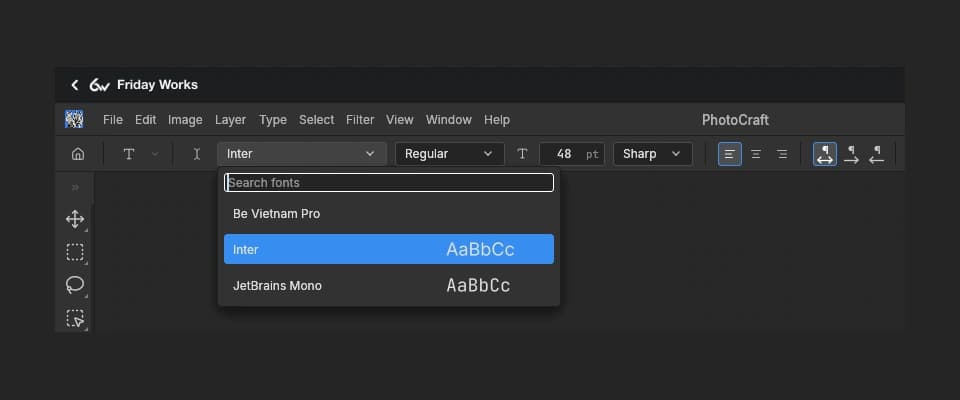
Open PhotoCraft from Friday Works’ Tools page, select the T tool and open the font picker in the options bar. Be Vietnam Pro now appears alongside Inter and JetBrains Mono. If a tab was open before the font addition, save your work and reload the page to read the new catalog.
Friday Works added the unchanged Be Vietnam Pro Regular font under the SIL Open Font License 1.1. The application remains PhotoCraft 0.15.1. This workflow was retested on the public website after the earlier local experiment. Only Regular was added; bold and italic variants are not covered by the test.
Edit Vietnamese text in a PSD with the added font
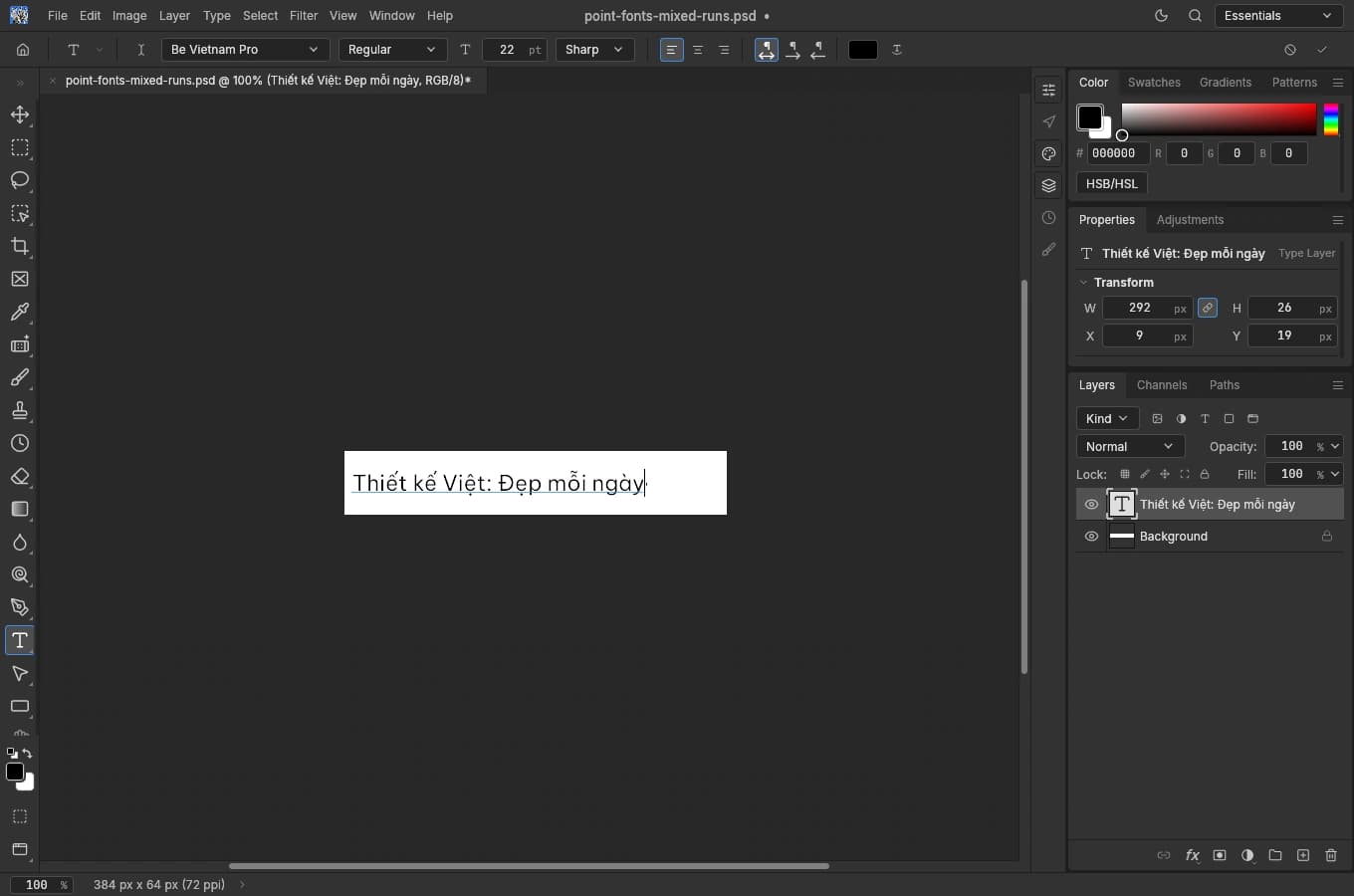
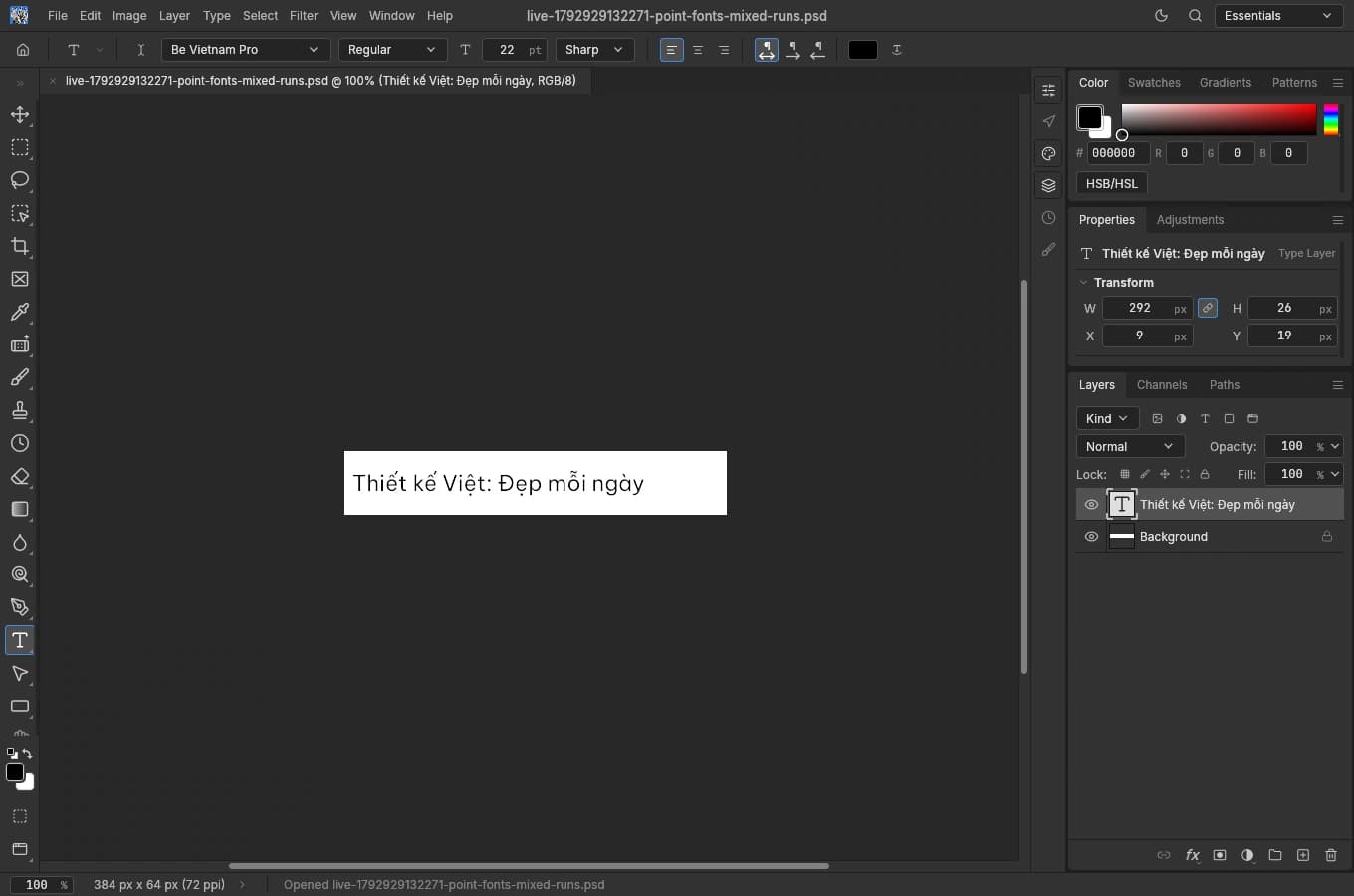
Open the PSD, select the actual layer with the T thumbnail in Layers and select the T tool. Apply Be Vietnam Pro, Regular, 22 pt to the whole layer. Changing an options-bar font with no layer selected may change only the tool default rather than the document’s text.
Click the text on the canvas, select all characters and enter the replacement. In the public test, Friday Works typed “Thiết kế Việt: Đẹp mỗi ngày” and observed the Vietnamese accents. Click the checkmark in the options bar to commit the text before saving.
This is an intentional substitution, not restoration of the source’s four fonts. Fonts can produce different widths: the earlier Inter Regular 22 pt test measured 285 pixels, while Be Vietnam Pro Regular 22 pt measured 292. Approve the layout after changing a font.
Save the PSD and load the font before reopening in a new session
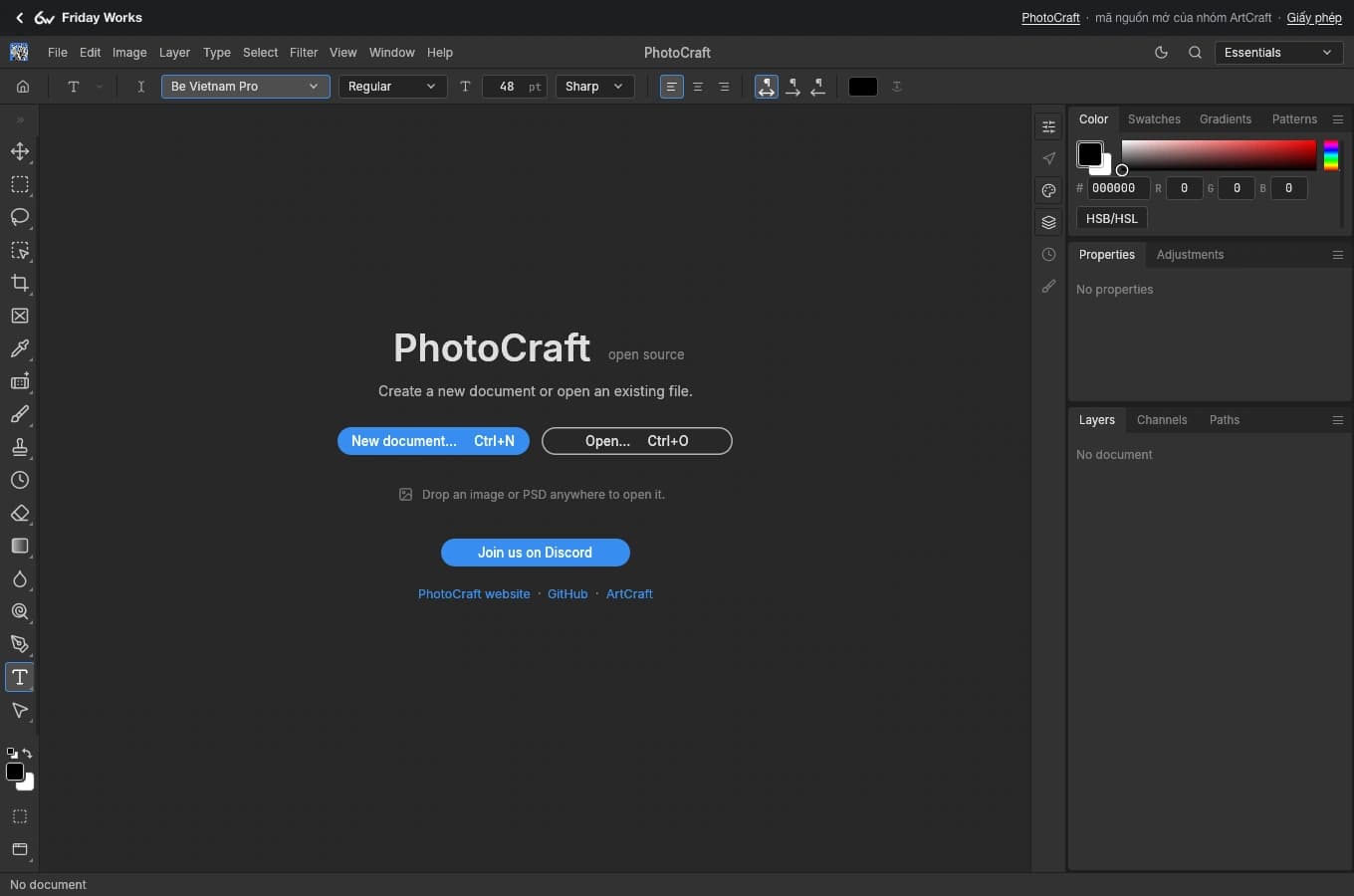
Choose File → Save As… and keep the downloaded PSD separate from the original. In a new PhotoCraft session, you can load the font before opening the file: on the welcome screen, select T, choose Be Vietnam Pro and wait for it to load, then use File → Open… to open the saved PSD.
Friday Works followed this sequence in the public build. The saved file reopened without a missing Be Vietnam Pro warning. The 48 pt value in the welcome-screen image is a tool default before any document is open; the test PSD still opens at 22 pt, not 48 pt.
Fonts load on demand. On a slow connection, wait for loading to finish before editing or assessing a warning. A family appearing in the picker does not establish that the font file is already loaded in that session.
Public-build results after saving and reopening the PSD
The downloaded PSD retained two layers, the Vietnamese sentence and BeVietnamPro-Regular at 22 pt. Independent parsing found unchanged type bounds: x=9, y=19, width 292 and height 26 pixels. The text placement transform was also preserved.
Friday Works used Type → Update All Text Layers to render text again in the new session, then exported PNG and saved PSD again. The PNG exported before saving and the PNG exported after reopening/refreshing matched pixel for pixel, as did the two PSD composites. The check did not rely solely on cached composite pixels.
This covers the tested single line at 22 pt. Friday Works has not tested multiline layouts, every input method or Unicode combination, bold/italic, complex PSDs or opening the outputs in Photoshop. No additional movement through saving/reopening does not mean every font substitution preserves the original layout.
Why can a publicly available font still produce a warning?
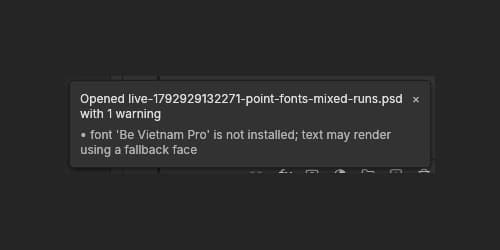
In a new session that opens the PSD before Be Vietnam Pro is loaded, PhotoCraft can still warn that the font is not installed and may use a fallback. This negative control was repeated after public deployment. A correct-looking saved composite is insufficient evidence that the font has loaded.
Select Be Vietnam Pro in the picker to load it, wait, then reopen the file. The load-first sequence above reopened without the warning. The tested PSD does not automatically carry the font file to every receiving environment; recipients still need the font and appropriate rights, or an approved PNG alongside the PSD.
Before using a PSD for production work
PhotoCraft is worth trying for inspecting a design or checking its layers in a browser. For text changes and editable handoff, also validate font availability, Vietnamese accents, line wrapping, letter spacing and text bounds.
Test a customer file on a copy and compare it with the approved reference. A font change can make a headline overflow while leaving the layer count intact. Print or production work needs validation through the receiving team’s actual handoff workflow.
When reporting a problem, retain the source and downloaded file, and record the PhotoCraft version, preceding action and warning. Opening the file, preserving font metadata and rendering edited text correctly are separate checks.
FAQ
Frequently asked questions
Can PhotoCraft open a layered PSD?
PhotoCraft 0.15.1 opened and saved a two-layer PSD in the 25 October 2026 test. Type and background remained separate after reopening. This result does not guarantee compatibility with every complex PSD.
Why can the preview look correct while fonts are missing?
A PSD may contain a previously saved merged composite. Its appearance and stored font names do not prove the fonts are available to render edited text. Resolve warnings and approve the resulting layout before handoff.
How thoroughly was the saved PSD checked?
Friday Works retested Be Vietnam Pro Regular 22 pt publicly after deployment: download the actual PSD, load the font in a new session, reopen, refresh text and export PNG. Both layers, Vietnamese text, font/size and position were retained, with identical before/after PNGs. Outputs have not been reopened in Photoshop.
Is Be Vietnam Pro available in public PhotoCraft now?
Be Vietnam Pro Regular has been available in public PhotoCraft on Friday Works since 25 October 2026. Select the T tool and Be Vietnam Pro family to load it. Only Regular was added; the application remains version 0.15.1.
Does changing fonts preserve text width?
The fonts produced different widths for the test sentence: Be Vietnam Pro 292 pixels and Inter 285 pixels at 22 pt. Each retained its own bounds and position through saving/reopening; this does not mean every substitution preserves the original layout.
Why can a reopened PSD still warn about Be Vietnam Pro?
Be Vietnam Pro loads on demand. A new session can open the PSD’s saved composite before loading the font. Select Be Vietnam Pro, wait for loading and reopen the file. The load-first workflow was tested publicly without the warning for this sample.
References
Sources used in this guide
We prioritise official guidance and primary technical sources. Visit each source for full context and the latest updates.
- PhotoCraft 0.15.1: official release matched against four files served by the tested web runtimeArtCraft Team and PhotoCraft contributors ↗︎
- PhotoCraft official test corpus, pinned snapshot: Photoshop-authored samples, merged-composite provenance and font limitationsArtCraft Team and contributors ↗︎
- Exact sample tested: point-fonts-mixed-runs.psd, 384 × 64, two layers; original corpus content, not a customer documentArtCraft Team and contributors ↗︎
- Corpus image/data permission: MIT License, copyright © 2026 ArtCraft Team and contributors; full permission notice. Fonts referenced by name, font binaries not includedArtCraft Team and contributors ↗︎
- Corpus notice and original-work provenance; alternative Apache-2.0 licensingArtCraft Team and contributors ↗︎
- Initial real PSD UI captures by Friday Works, 2026-10-25, PhotoCraft 0.15.1: original sample, Layers, Type controls, missing source-font warnings and Save As menu. Full editor and crops optimized to WebP. Current cover and Vietnamese-edit screenshots credited separately belowFriday Works / ArtCraft Team and contributors ↗︎
- UI reuse permission: MIT License, copyright © 2026 ArtCraft Team and PhotoCraft contributors; full permission notice. Bundled assets retain their own licensesArtCraft Team and PhotoCraft contributors ↗︎
- Friday Works hosted official web builds: version and checksum manifestFriday Works ↗︎
- PhotoCraft 0.15.1 official web hosting: optional fonts/manifest.txt and on-demand font files; browser build does not expose system fontsArtCraft Team and contributors ↗︎
- Be Vietnam Pro Regular: unchanged font file added to public PhotoCraft; pinned source and checksum verifiedThe Be Vietnam Pro Project Authors / Google Fonts distribution ↗︎
- Be Vietnam Pro font reuse and redistribution: copyright 2021 The Be Vietnam Pro Project Authors, SIL Open Font License 1.1; retain full copyright and license alongside unchanged font. Not relicensed under the UI MIT licenseThe Be Vietnam Pro Project Authors ↗︎
- Current real public-build captures, Friday Works 2026-10-25 after Be Vietnam Pro deployment: Friday Works embedded font picker (crop 850 × 265 in 960 × 400), Vietnamese Type edit, welcome-screen font preload, reopened downloaded PSD and unloaded-font warning (crop 370 × 97 in 500 × 250). Full editor shots optimized to WebP. Cover: real reopened editor at 200% zoom, proportionally reduced to 980 × 649 in 1400 × 1400 neutral frame. No invented UI, values or result; all new images are public, replacing earlier local-test imagesFriday Works / ArtCraft Team and contributors / The Be Vietnam Pro Project Authors ↗︎
- Public Be Vietnam Pro Regular deployment fcca9b0: host font manifest, original font, full OFL license and attribution; application runtime unchangedFriday Works ↗︎
- Public PhotoCraft font catalog: Be Vietnam Pro Regular and its same-host file/license pathsFriday Works ↗︎