

ContentsTap to jump to a section+
- PhotoCraft 0.15.1 is available in the browser at Friday Works and developed by the ArtCraft team.
- The check opened a 1,000 × 1,000-pixel JPEG; complex PSD and export workflows need separate testing.
- Cover and body images show the actual hosted build captured on October 25, 2026.
Start exploring photo editing in your browser
Need to open a picture on a computer without an image editor installed? PhotoCraft has a browser version with a toolbar, a document workspace and a Layers panel. Friday Works hosts the official web build so you can open the application directly.
PhotoCraft is an open-source application by the ArtCraft team. Friday Works provides access to the web build; it did not develop the application. This introduction covers PhotoCraft 0.15.1, checked on the website on October 25, 2026.
During a desktop Chrome check, Friday Works opened a 1,000 × 1,000-pixel JPEG. The opening steps below describe that observed workflow. Other capabilities are identified as developer documentation rather than presented as features tested in this session.
Recognize the main parts of the workspace
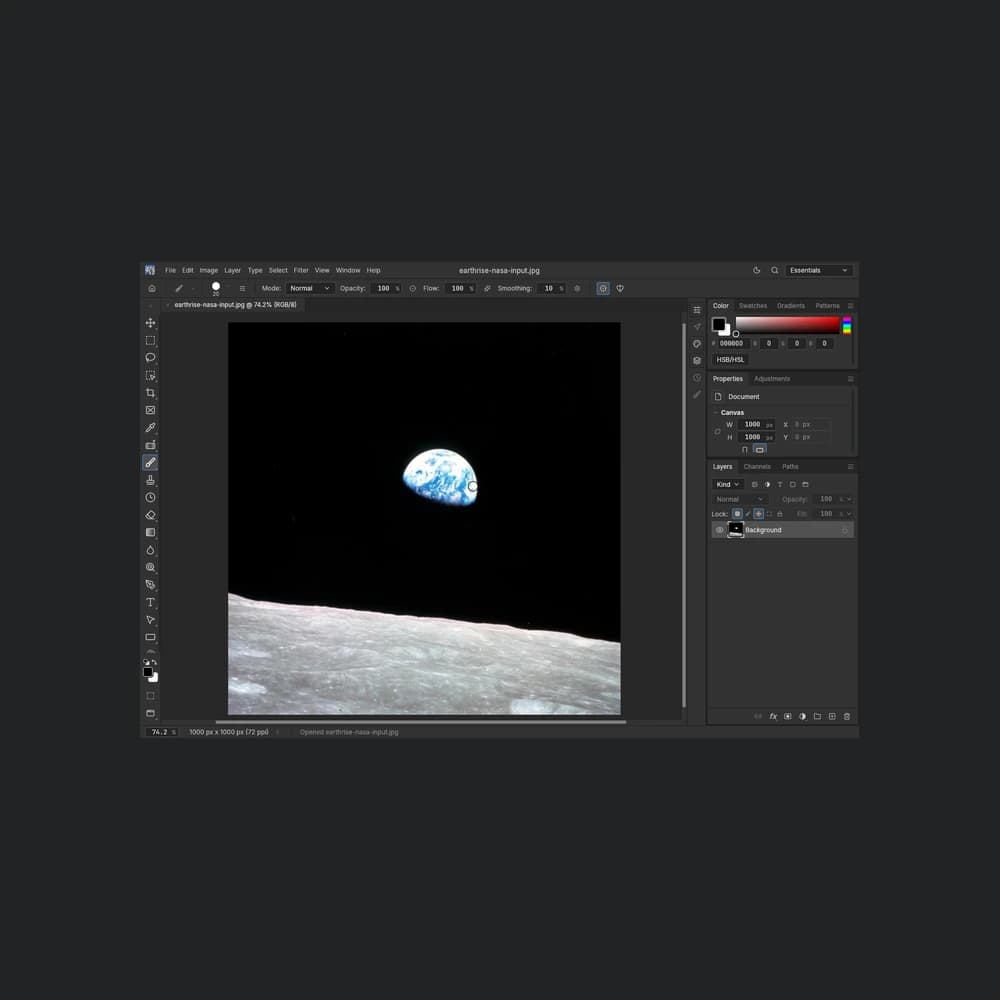
The middle of the screen displays the open picture. A document tab shows the filename so you can identify the file you are working on. Tools run down the left side, while menus including File, Edit, Image and Layer sit across the top.
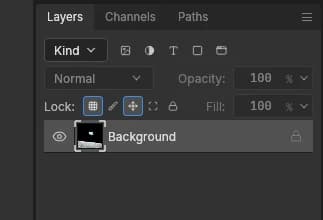
The Layers panel on the right organizes separate pieces of document content. A layer is a part of the document that can be managed independently. The JPEG opened in this check appears as a single Background layer; a layered document can have a different structure.
The captured interface uses English labels. Match the names shown on your screen, such as Open… and Layers, when following the article. Start with a copy of a picture so the original remains available.
Open your first JPEG in PhotoCraft
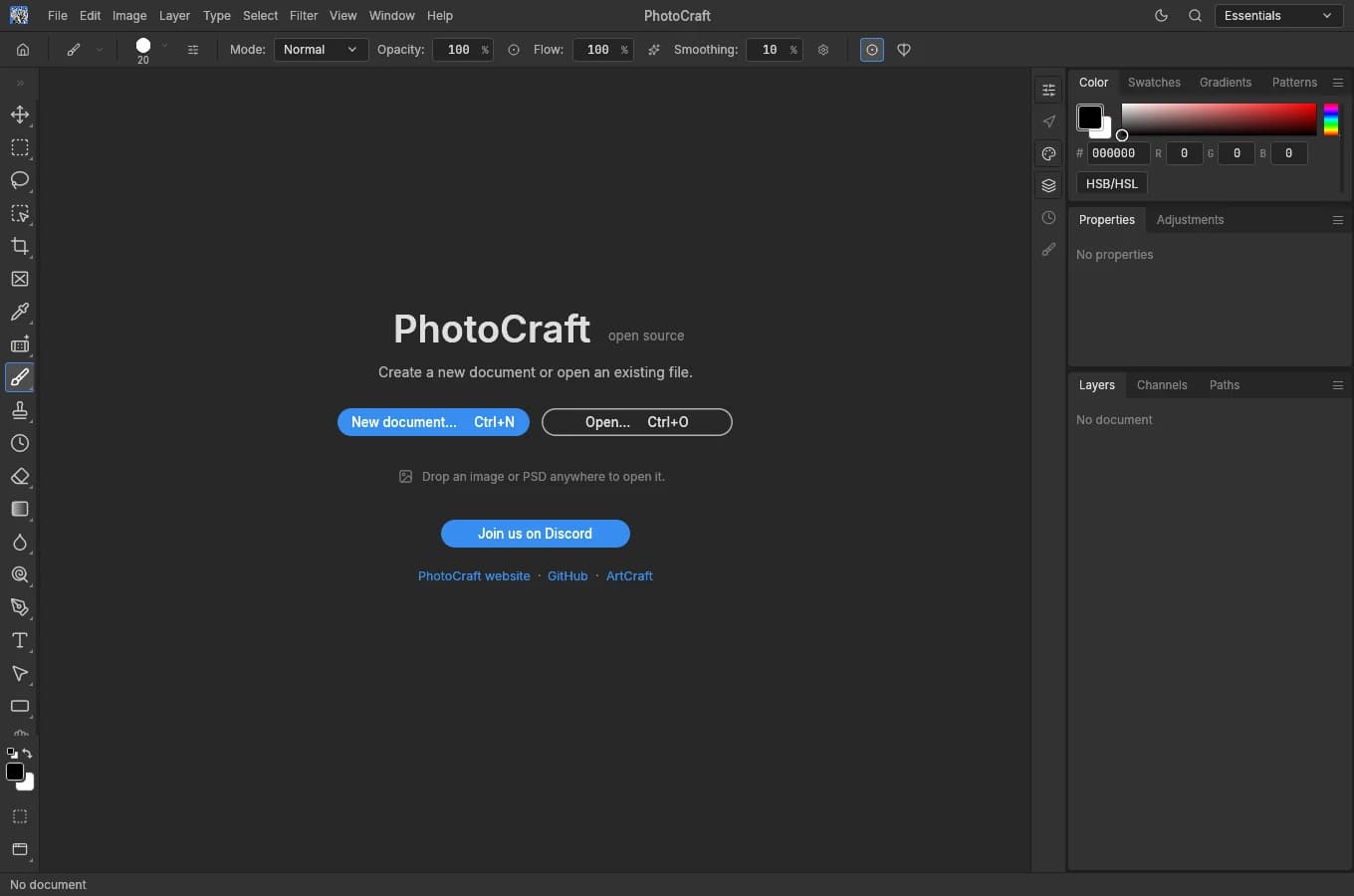
Step 1: open the PhotoCraft tool page at Friday Works and wait for the application to load. Its start screen offers New document… and Open…. New document… starts a new document; this check used Open… for an existing file.
Step 2: choose Open…, select a JPEG from your device and confirm in the browser file picker. The test input was NASA’s Earthrise image, not customer data.
Step 3: check the filename in the document tab, the picture in the workspace and the Background entry in Layers. The interface also showed the test image’s dimensions of 1,000 × 1,000 pixels. These details help confirm that the intended file has opened.
Opening a picture does not complete an editing or export workflow. When trying another feature, keep the original and reopen the output to check it before using it in a post or sending it to someone else.
Layers, masks and PSD support
The upstream project documents layers, masks, text, adjustment layers and PSD/PSB reading and writing. A mask controls which parts of a layer are visible. PSD is a common format for design documents containing multiple layers.
Friday Works did not test a complex PSD in this introduction. For a design containing custom fonts, effects or many layers, use a copy and compare it with a reference image supplied by its author. Successfully opening a document does not establish that every font and effect matches the originating application.
A single-layer JPEG is an easier starting point for a first check. Once you can identify the document tab and Layers panel, try individual features on a small sample and inspect the result before moving a collection of work files into the editor.
File handling and practical limitations
The hosting repository describes the web build as opening and processing files in the browser and saving output to the device. The browser still downloads application code and required assets over the network at startup. This describes the web application’s architecture, not an absolute privacy guarantee for every feature or the entire website.
PhotoCraft is in early alpha. Its developers also state that it is not yet a replacement for every professional Photoshop workflow. Fonts, document content and the device being used are all reasons to test your particular task.
A content editor or small-shop owner can start with a small picture they have permission to use. For deadline-sensitive work, validate opening, editing and saving or exporting before committing a project. This article checked the desktop web build and does not establish equivalent behavior on a phone.
Try PhotoCraft with a copy of your picture
Open PhotoCraft from the Friday Works tools directory, select a copy of a JPEG and identify the workspace areas described above. If your next task involves arranging a video over time, FilmCraft is a separate application available in the same directory.
The cover shows the real interface displaying Earthrise by William Anders/Apollo 8/NASA. The NASA image is public-domain material in the United States; its use does not imply NASA endorsement. Friday Works captured the interface on October 25, 2026, resized it proportionally and added dark margins to preserve the workspace. Image sources, author notices and license links appear below.
FAQ
Frequently asked questions
Who develops the PhotoCraft application hosted at Friday Works?
PhotoCraft is developed by the ArtCraft team and contributors. Friday Works hosts the official web build in its tools directory; it did not develop the application.
What was tested for this introduction?
Friday Works opened a 1,000 × 1,000-pixel JPEG in PhotoCraft 0.15.1 using desktop Chrome on October 25, 2026. Image export and complex PSD files were not tested in this check.
References
Sources used in this guide
We prioritise official guidance and primary technical sources. Visit each source for full context and the latest updates.
- PhotoCraft 0.15.1: official release, published October 23, 2026 UTCArtCraft Team and PhotoCraft contributors ↗︎
- PhotoCraft 0.15.1 documentation: layers, formats and early-alpha statusArtCraft Team and PhotoCraft contributors ↗︎
- Friday Works hosting: unmodified official builds, exact versions, attribution and browser file handlingFriday Works ↗︎
- Screenshots: Friday Works, October 25, 2026, actual hosted PhotoCraft 0.15.1; own capture. Cover: full 1360×900 UI proportionally reduced to 719×476 inside a 1000×1000 dark frame; body: start screen and Layers detail crop; no UI edits. Underlying UI copyright © 2026 ArtCraft Team and PhotoCraft contributors, MIT/Apache-2.0; third-party notices retainedFriday Works / ArtCraft Team and contributors ↗︎
- UI reuse permission: MIT License, © 2026 ArtCraft Team and PhotoCraft contributors; full copyright and permission noticeArtCraft Team and PhotoCraft contributors ↗︎
- Earthrise input: William Anders, Apollo 8/NASA, December 24, 1968; NASA-provided square JPEG opened locally; no customer dataNASA / William Anders ↗︎
- NASA media use guidance: US-government material, attribution, third-party exceptions and no endorsement; Earthrise photo used as public-domain materialNASA ↗︎