

ContentsTap to jump to a section+
- FilmCraft 0.12.0 runs in the browser at Friday Works with Project, Program and a multitrack timeline.
- Preview scenes belong to the built-in developer demo, not customer videos.
- This introduction checks the interface; importing and exporting your own clips needs a separate trial.
A browser workspace for learning video editing
Before editing a clip, you need to know where the source material lives, where to preview the picture and where to arrange the shots. FilmCraft has a browser version with those workspace areas. Friday Works hosts the official web build so you can open it and explore.
FilmCraft is an open-source video editor by the ArtCraft team. Friday Works hosts the web version; it did not develop the application. This introduction covers FilmCraft 0.12.0 served on the website and checked in desktop Chrome on October 25, 2026.
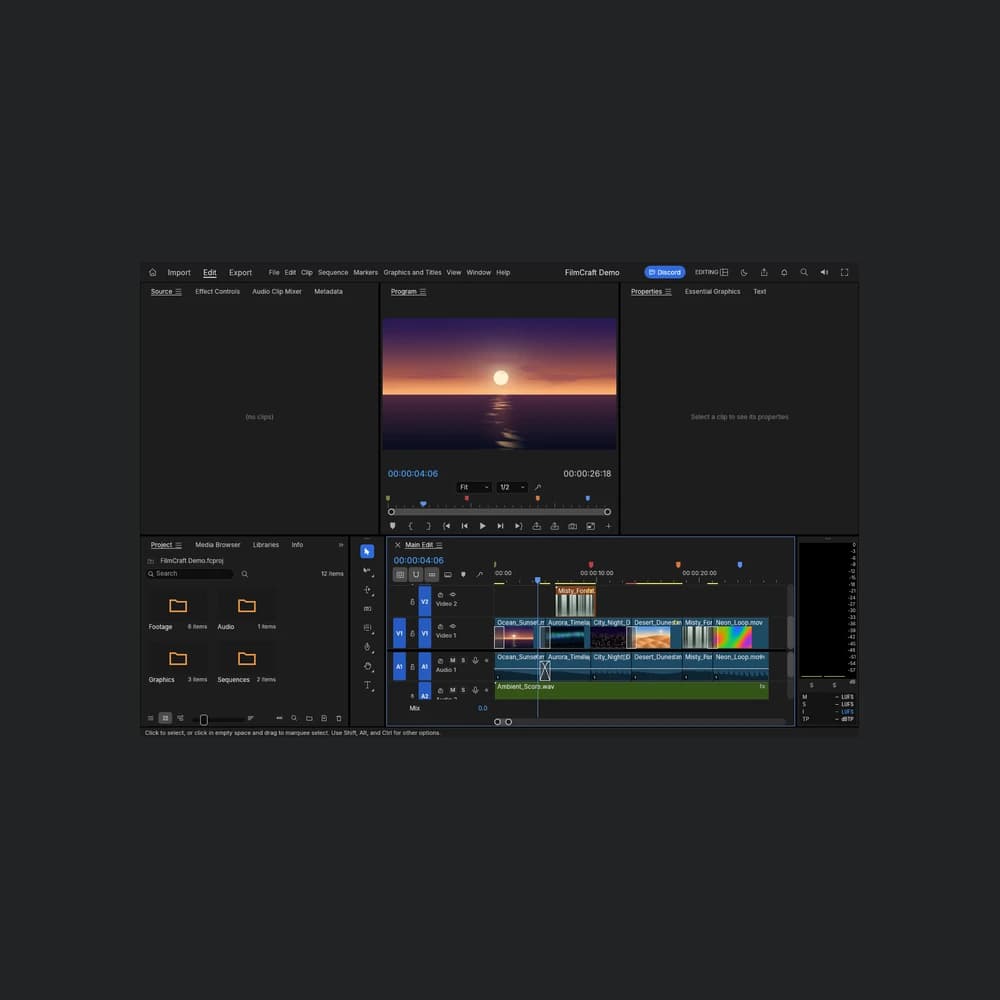
The application opened to FilmCraft Demo, a built-in project containing media folders, a preview monitor and a multitrack timeline. The article’s screenshots show the actual running application. The sunset scene and other clips belong to its bundled demo material.
Project: identify the source material
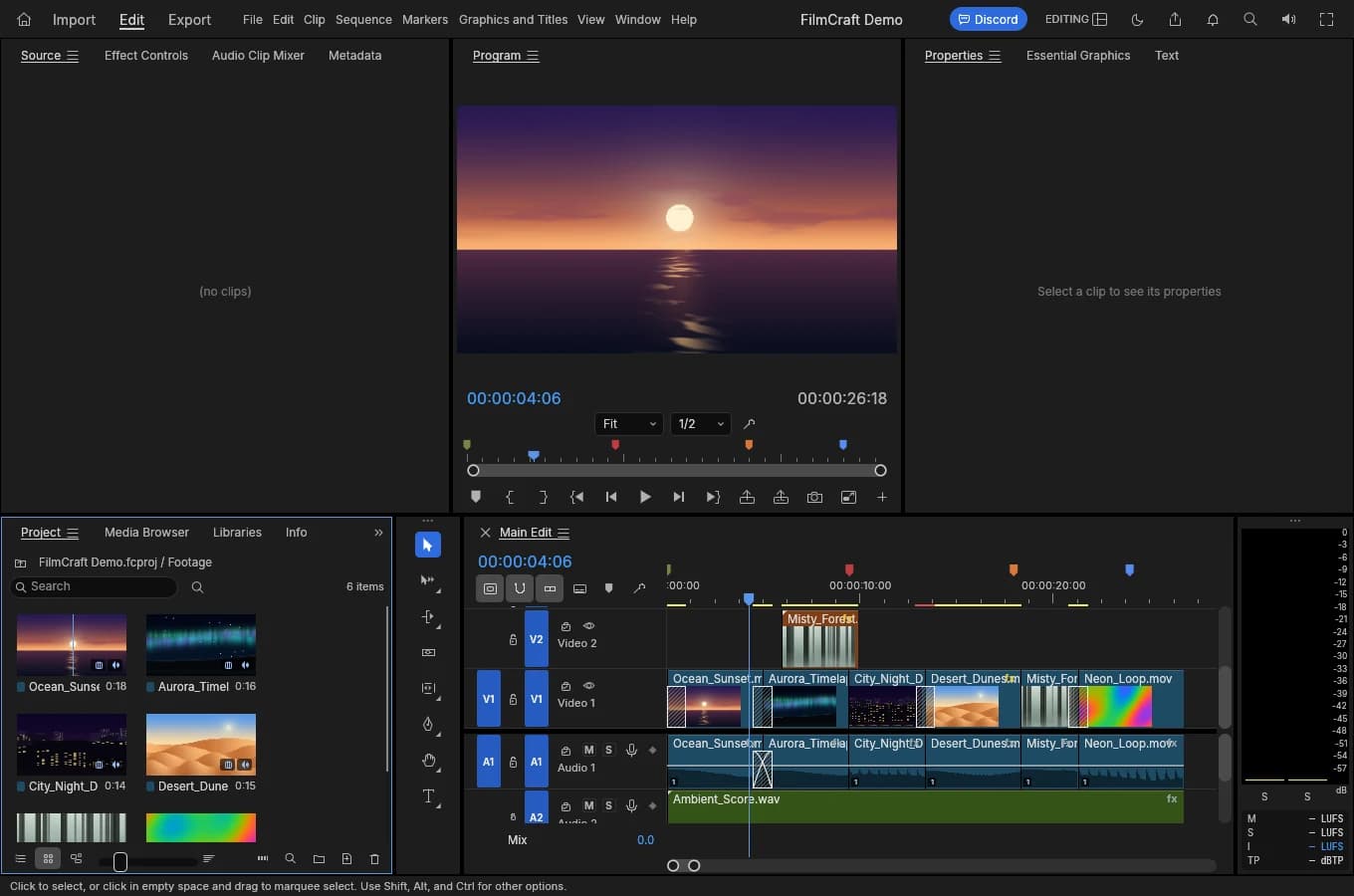
The Project panel sits at the lower left in the captured layout. The sample project has Footage, Audio, Graphics and Sequences folders, separating picture sources, sound, graphics and assembled sequences.
During the check, opening Footage displayed the sample media items inside the Project panel. Filenames and thumbnails help identify items before inspecting how they are arranged on the timeline. Names and item counts belong to the built-in demo, not a Friday Works customer media library.
For a product introduction video, a useful preparation step is to gather your recorded clips, licensed audio and any still images separately. This is a suggested preparation workflow for your own trial, not a claim that importing those files was validated in this introduction.
Program and timeline: read the edit
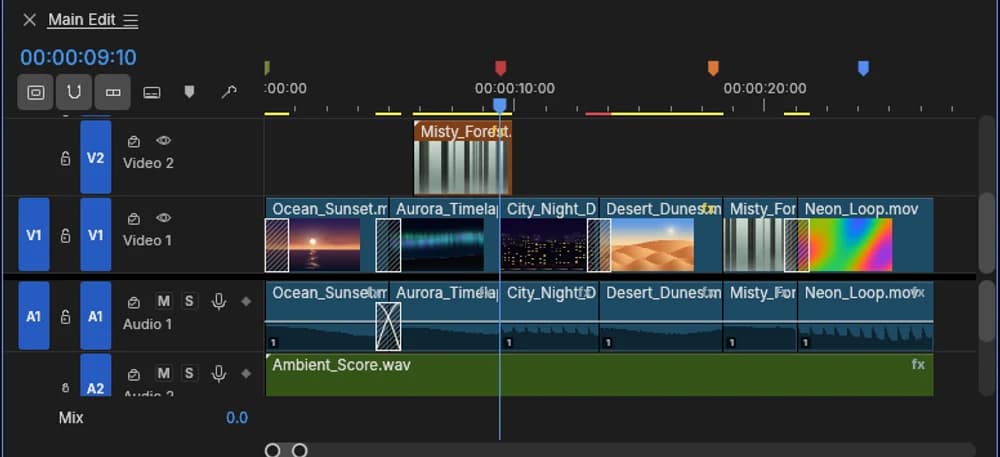
The Program monitor above the timeline displays the picture at the current sequence position. The timeline arranges segments along a time axis. In the demo, V1 and V2 hold picture content, while A1 and A2 hold audio.
A track is a row of content on the timeline. Separate picture and audio rows make the edit easier to read: which segments follow one another and which sit on higher or lower tracks. The playhead and time ruler show the current position within the sequence.
When exploring, match the timeline position with the picture in Program and read the name of the segment at that position. The first goal is to understand what the workspace shows before trying to trim or change clips.
The upstream project documents multitrack editing, effects, audio work and video export. A documented feature does not establish that Friday Works has tested every format or device in the browser build.
Keep the first trial small
A new editor or content creator can use the demo to learn how to read the workspace. For your own material, prepare a short clip you have permission to use, retain the original and validate importing through to export before committing a deadline-sensitive project.
Reopen the exported file in another player to inspect picture, sound, duration and synchronization. If the clip contains Vietnamese text, also check diacritics and fonts in the output. These are acceptance criteria for a later trial, not measured export results from this introduction.
The current check confirms that the web application starts and displays its sample project. Friday Works did not complete importing a separate clip, trimming and exporting an MP4 in this session, so this article makes no performance, export-quality or universal-codec claim. A codec is the method used to encode picture or sound inside a media file.
Web behavior, rights and limitations
FilmCraft is in alpha and remains under development. For time-sensitive work or a large media collection, a trial on your actual computer and files matters more than seeing a feature in a menu. This check used a desktop browser and does not confirm equivalent behavior on a phone.
The hosting repository describes the web build as processing files in the browser. It still downloads application code and assets at startup. Optional speech features can download additional model weights from Hugging Face after a confirmation dialog. Those speech features were not enabled or tested for this article.
FilmCraft’s source code is licensed under MIT or Apache-2.0, with separate notices for third-party assets. The application license does not grant rights to music, pictures or footage you import. Use your own material or assets you have permission to use.
Explore the workspace, then test a short clip
Open FilmCraft from the Friday Works tools directory and match Project, Program and the timeline with the screenshots in this introduction. If you need to prepare or inspect a still image before editing a video, PhotoCraft is a separate image editor in the same directory.
The cover and body screenshots show FilmCraft 0.12.0 captured on October 25, 2026. The preview scenes are the developers’ code-generated demo content, not live-action footage or customer results. The cover was proportionally reduced with dark margins, while the timeline image was cropped for legibility. Sources, authors and licenses appear below.
FAQ
Frequently asked questions
Which FilmCraft version is shown at Friday Works?
The browser build checked on October 25, 2026 is FilmCraft 0.12.0, developed by the ArtCraft team and hosted by Friday Works. Article screenshots were captured from that running build.
Are the videos in the FilmCraft screenshots customer work?
The scenes and timeline contents belong to the built-in FilmCraft Demo. They are code-generated developer sample data, not customer videos or evidence of commercial results.
References
Sources used in this guide
We prioritise official guidance and primary technical sources. Visit each source for full context and the latest updates.
- FilmCraft 0.12.0: official release, published October 23, 2026 UTCArtCraft Team and FilmCraft contributors ↗︎
- FilmCraft 0.12.0 documentation: editing workflow, web build and alpha statusArtCraft Team and FilmCraft contributors ↗︎
- Friday Works hosting: exact official web version, attribution, browser processing and optional speech-model downloadsFriday Works ↗︎
- Screenshots: Friday Works, October 25, 2026, actual hosted FilmCraft 0.12.0 and its built-in procedural demo. Cover: 1360×900 UI proportionally reduced to 719×476 inside a 1000×1000 dark frame; body: Project/Footage screen and timeline detail crop; no UI edits. Underlying UI and generated demo copyright © 2026 ArtCraft Team and FilmCraft contributorsFriday Works / ArtCraft Team and contributors ↗︎
- Demo rights: Assets drawn or generated in code; ocean sunset, aurora, city night, dunes and forest from crates/media/src/generators.rs; original code under MIT OR Apache-2.0, not external footageArtCraft Team and FilmCraft contributors ↗︎
- UI/demo reuse permission: MIT License, © 2026 ArtCraft Team and FilmCraft contributors; full copyright and permission noticeArtCraft Team and FilmCraft contributors ↗︎
- Notices: trademarks and bundled third-party licenses remain applicableArtCraft Team and FilmCraft contributors ↗︎