

ContentsTap to jump to a section+
- Public preview requires GitHub CLI 2.103.0 or later and an explicit opt-in.
- Access tokens expire, but refresh credentials still need protection and incident revocation.
- Scripts caching a token can fail at expiry; never print secrets into logs as a test.
A new sign-in option for the command-line client
GitHub announced a public preview of expiring, automatically refreshed OAuth credentials in GitHub CLI 2.103.0 on October 21, 2026. Teams using gh should inspect scripts and extensions that capture a token once and reuse it over time before opting in.
An access token authorizes API calls; OAuth lets users approve an application’s access. GitHub says gh stores a short-lived access token with a rotating refresh token and refreshes it when needed, reducing the lifetime of a leaked access token.
The option does not automatically migrate existing sign-ins or manually supplied credentials. The2.103.0 release says environment-supplied tokens are not refreshed. Updating the CLI does not rotate every CI secret.
Check both client and host support
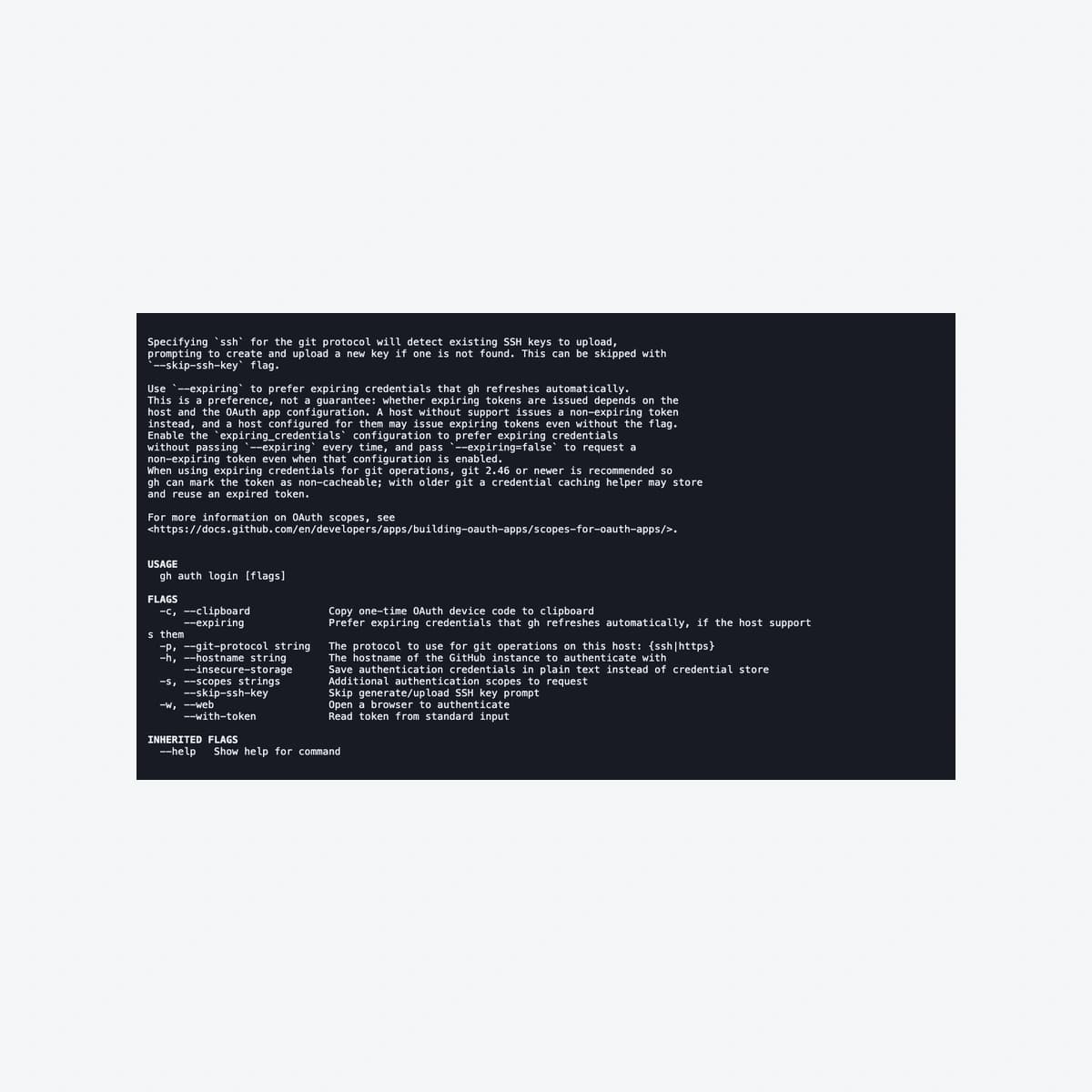
GitHub documents the --expiring login flag and a configuration preference for future sign-ins. Inspect the installed binary’s help before applying them; older clients may not support the flag.
The announcement lists github.com, ghe.com and GitHub Enterprise Server from3.23. Unsupported servers may issue a normal nonexpiring token despite the preference. Confirm the credential actually issued rather than relying only on a successful login command.
For HTTPS Git, GitHub recommends gh as the credential helper and Git2.46 or later to avoid caching past expiry. Review an existing helper before changing it. This article’s capture used help only, without sign-in or configuration changes.
The fragile boundary is token reuse outside gh
A script that captures a token at startup can retain the expired string even after gh refreshes its own credential. GitHub recommends obtaining a fresh value when needed rather than caching it. Inventory external tools, long-running jobs and extensions managing authentication.
Friday Works suggests read-only tests on owned sample resources, covering initial access, refresh and revocation with sanitized logs. Never expose a token in screenshots or third-party logging merely to verify behavior.
Keep an incompatible workflow on its existing method while fixing the integration. Broader permissions do not solve expiry. Credential lifetime, scopes and storage require separate decisions.
Short-lived access still needs protection and verification
A refresh token remains a valuable secret because it can obtain new access tokens. Review device access, credential storage, offboarding and application revocation. Suspected compromise requires incident handling, not merely waiting for access-token expiry.
Record host, gh/Git versions, helper and tested scripts before wider rollout. Confirm needed Git/API operations, appropriate scopes and secret-free logs. These are proposed acceptance checks, not a production refresh test performed here.
The original October 22 cover shows real help output from the official2.103.0 binary in an xterm web terminal. The --expiring option is actual CLI output, not reconstructed HTML. Only help/version ran; no credentials were created. MIT notices are retained.
References
Sources used in this guide
We prioritise official guidance and primary technical sources. Visit each source for full context and the latest updates.
- GitHub CLI expiring OAuth public preview —21 October 2026GitHub ↗︎
- GitHub CLI 2.103.0 release —21 October 2026; environment token limitationGitHub CLI maintainers ↗︎
- GitHub CLI authentication and refreshable-token behavior; maintained documentationGitHub Docs ↗︎
- GitHub CLI 2.103.0 official binary; original read-only PTY/help capture in xterm by Friday Works, 22 October 2026; no authentication performedGitHub / Friday Works ↗︎
- GitHub CLI MIT license, full notice retainedGitHub ↗︎
- xterm terminal emulator MIT license; actual program output, not a reconstructed product UIxterm.js contributors ↗︎