

ContentsTap to jump to a section+
- Requires Take notes for me and a meeting Chat conversation.
- Hosts and co-hosts only note recipients prevent a group recap.
- Deleting the recap card leaves the original notes document in Drive.
Meeting decisions and next steps arrive in Chat
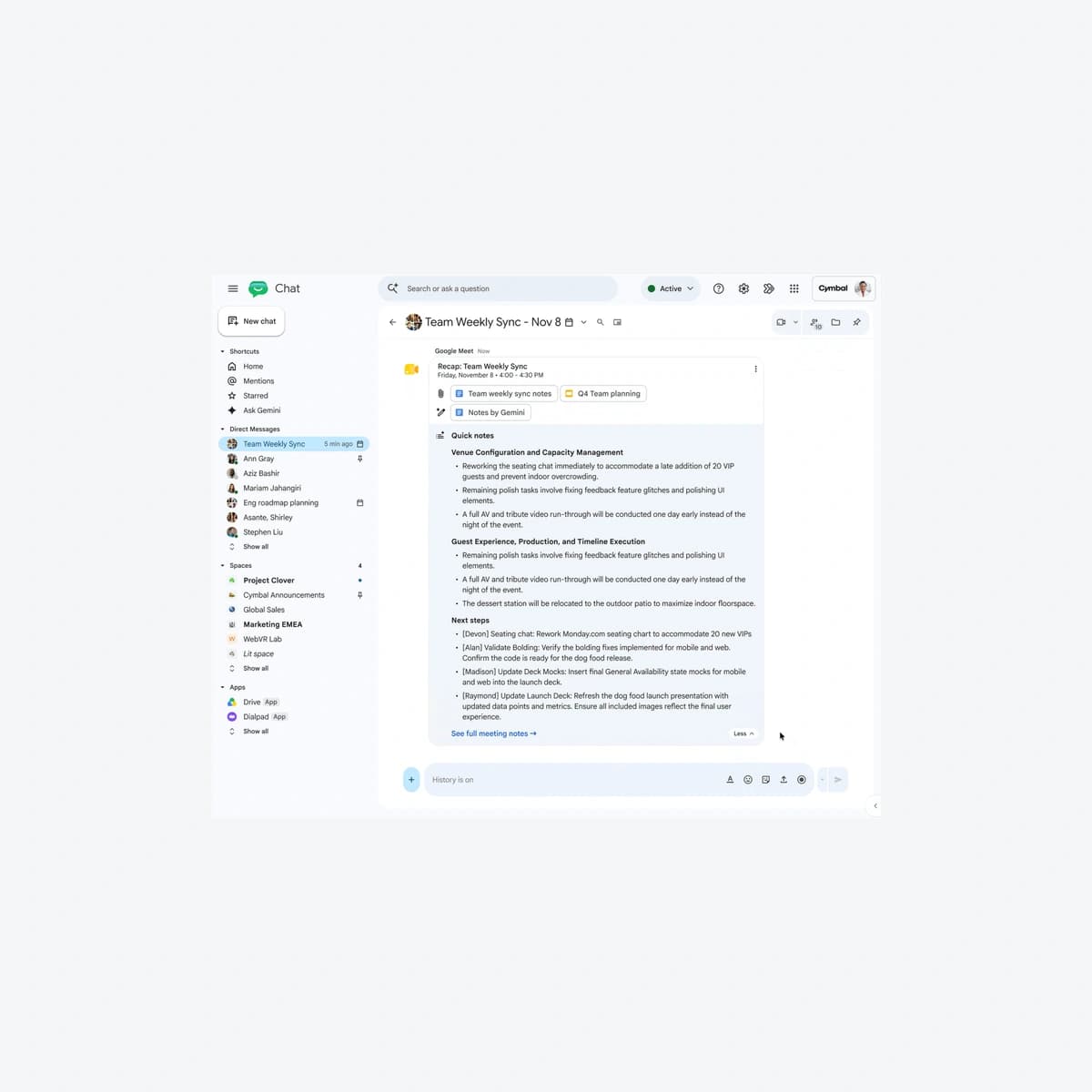
Google announced post-Meet recap cards in the meeting’s Google Chat conversation on October 19, 2026. With Take notes for me active and the required chat conversation, key points, decisions and next steps appear where the team continues discussion. Organizations should review note-sharing policy before adoption.
This changes information distribution, not vulnerability exposure established by an advisory. AI summaries can misread context. Friday Works recommends confirming owners and commitments before treating suggested actions as official assignments.
Note-taking and sharing settings determine delivery
Google requires Take notes for me to start during the meeting and an associated chat conversation. Recaps include highlights, suggested next steps and relevant file links. They do not mean every call automatically has a recording, transcript or complete meeting archive.
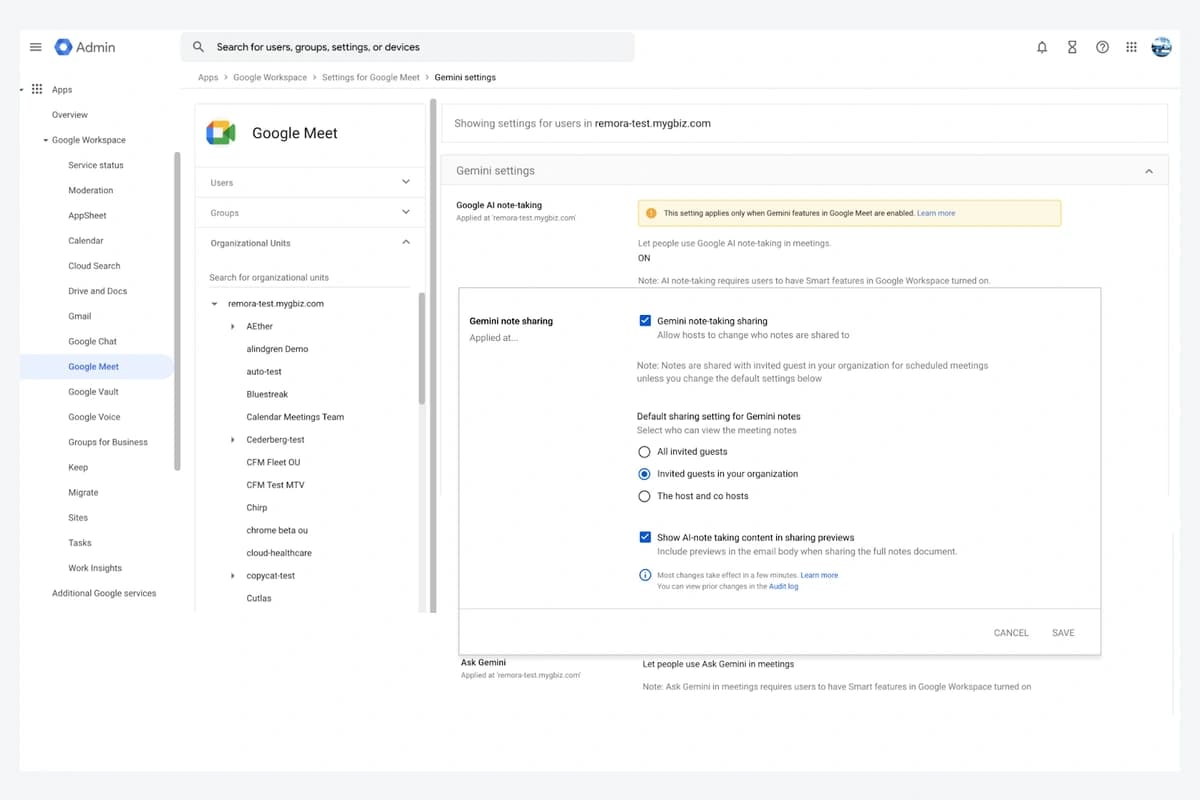
When Send notes to is set to Hosts and co-hosts only, the group chat receives no recap. This is an intentional recipient boundary, not an error to bypass. Check it alongside eligibility and rollout when a card is missing.
Friday Works recommends controlled sample meetings for group-shared and host-only notes. Do not add outsiders to a sensitive meeting simply to test delivery; data policy should determine the desired behaviour.
Cards arrive quietly and can be deleted
Google says recaps are delivered silently, without unread badges or bolding. Posting a card therefore does not prove everyone read or accepted an assignment. Processes requiring acknowledgement still need an explicit hand-off.
Google Chat Help says anyone in the conversation can delete the recap. The Chat summary is removed while the Gemini notes document remains in Drive. Friday Works recommends deciding where authoritative decisions are retained rather than relying solely on a removable card.
For a website handover meeting, a host could verify the recap and confirm issue owners and dates. That is an operational suggestion, not a claim that the feature creates tickets, updates project systems or guarantees delivery.
The two release tracks have different start dates
The October 19 notice says Rapid Release began October 16 and Scheduled Release starts October 27, each over up to 15 days. Eligible editions listed are Business Standard/Plus, Enterprise Standard/Plus and Frontline Plus. Access should not be assumed complete on October 20.
The current Take notes for me help lists English, French, German, Italian, Japanese, Korean, Portuguese and Spanish, with one supported language per meeting. Vietnamese is not listed; Vietnamese-speaking teams should not assume equivalent note-taking support.
Existing Take notes for me, Gemini and smart-feature controls apply; the notice lists no separate end-user recap setting. Friday Works recommends checking eligibility and policy before controlled content, recipient and deletion tests.
Images show Google’s actual Team Weekly Sync recap and administrative Meet note-sharing settings. People, tasks and meeting dates are demo data; they are not customer work or an approved meeting record. Source and rollout dates remain separate.
References
Sources used in this guide
We prioritise official guidance and primary technical sources. Visit each source for full context and the latest updates.
- Official announcement —19 October2026; see article for separate rollout datesGoogle Workspace ↗︎
- Get meeting recaps with Gemini in Chat — delivery, host-only restriction and deletionGoogle Chat Help ↗︎
- Take notes for me in Meet — prerequisites and note-sharing controlsGoogle Meet Help ↗︎
- Official product demonstration, published 19 October 2026; © Google, sample data. Selected static frame/crop, proportional resize and neutral framing; not customer results.Google Workspace ↗︎
- Google product screenshot guidance: explanatory/educational use; copyrighted UI, not a Creative Commons photograph. No affiliation or endorsement.Google ↗︎