

ContentsTap to jump to a section+
- Insights applies to notebooks assigned through Google Classroom.
- Students are told teachers can view chats in assigned notebooks.
- External sharing is off by default; administrators control domain scope.
AI summaries add context to assigned notebook activity
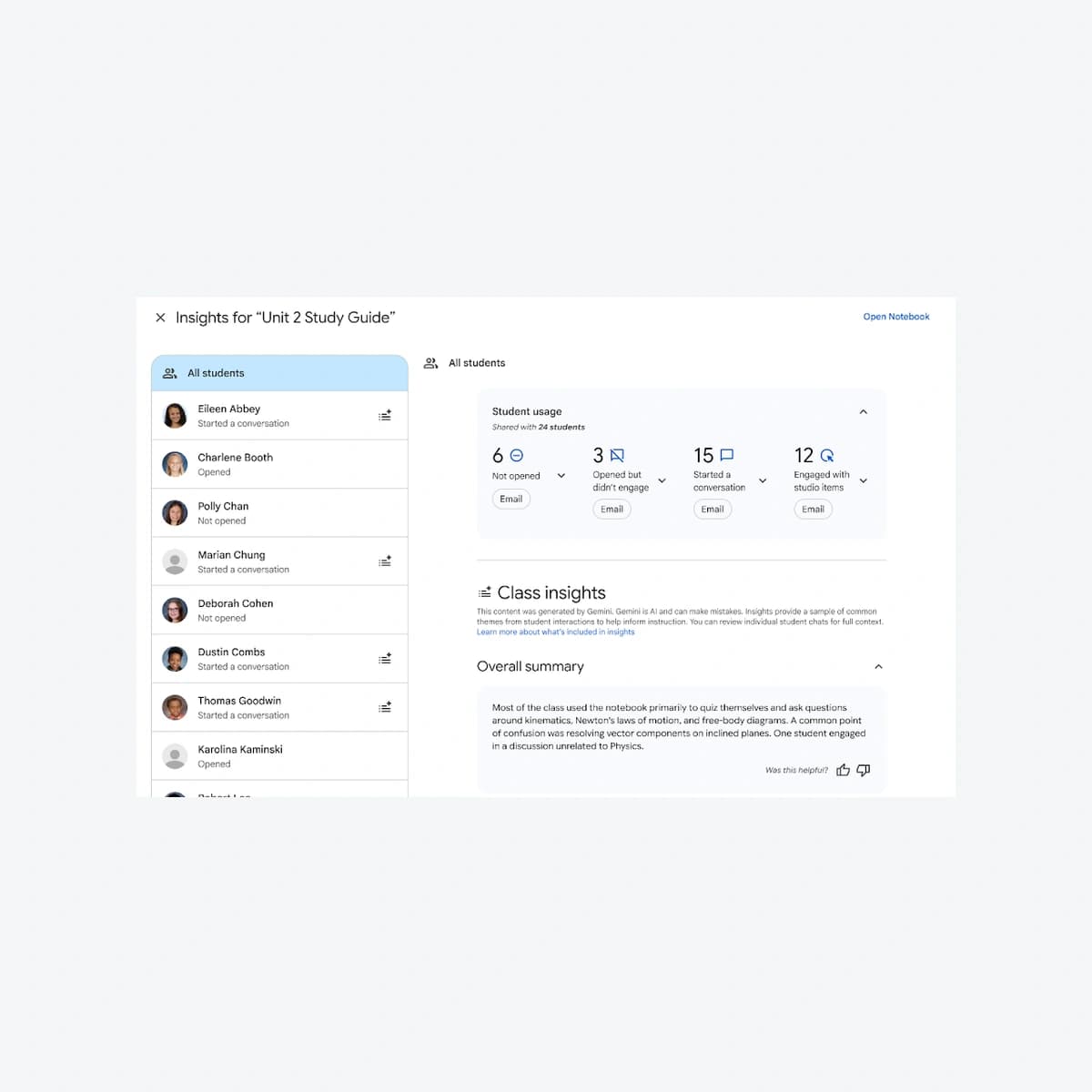
Google announced Insights for teacher-led Gemini Notebooks assigned through Classroom on October 19, 2026. Teachers gain usage information and learning themes, with access to individual assigned-notebook chats for context. Schools should review access and explain the feature before adopting it.
The change concerns learning-data visibility and interpretation, not a confirmed security incident. Its scope is Classroom-assigned notebooks; the announcement does not give teachers access to every private Gemini conversation.
Insights can surface questions without deciding achievement
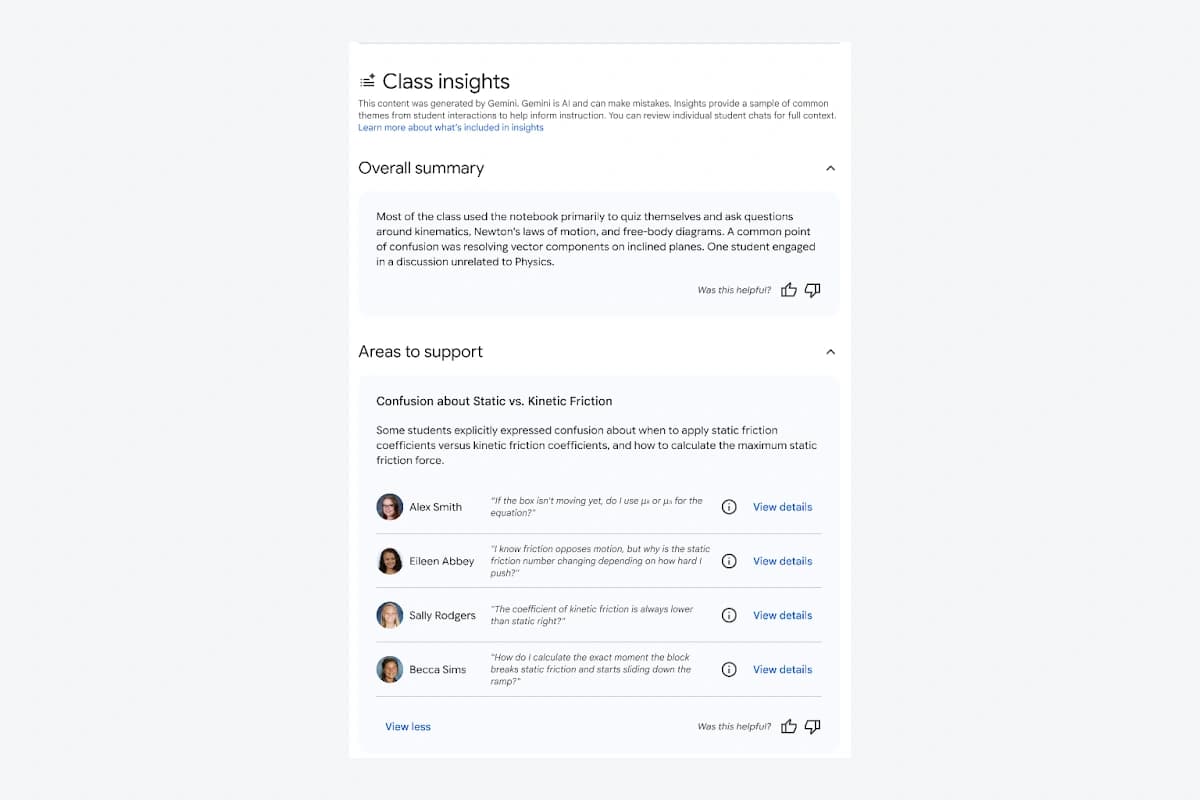
Google’s demo shows Student usage, Overall summary, Areas to support and Areas of strength. Its physics example groups questions about friction and forces. Names and counts are vendor sample data, not Friday Works classroom results.
Friday Works suggests using a concrete teaching question, then checking relevant chats before changing a lesson or feedback. Summaries can omit context, and notebook opens do not directly measure understanding.
Low activity should also prompt an access check. Missing data can reflect disabled access or lack of interaction rather than poor learning. These are implementation recommendations, not a new Google grading policy.
Domain sharing needs deliberate administration
The update also adds trusted-domain sharing, allowing approved cross-domain notebook use when an administrator enables it. External sharing remains off by default under the announcement.
Administrative settings distinguish no external sharing, allowlisted domains and broader external access; public-link sharing is separate. Friday Works recommends approving the required partner domains rather than opening sharing widely to solve a single collaboration need.
Notebook must be enabled for both teachers and students in the relevant groups or organizational units. Insights also needs student interactions. Access configuration and report content are separate troubleshooting checks.
Rollout and a practical school acceptance check
Google schedules Insights for both release tracks from October 19 over 1–3 days, listing Education Fundamentals, Standard and Plus. External-sharing updates are available according to the notice; Gemini LTI support is planned for coming weeks rather than already complete.
Friday Works recommends a school-owned sample notebook to check student notices and correct teacher scope. Test permitted and out-of-scope sharing with controlled accounts before using actual student content.
Schools should define who reviews chats and how to correct misleading AI interpretations. Insights supplies signals; teaching decisions still require review. This October 20 report preserves Google’s October 19 announcement date and does not assert completed access for every Vietnamese account.
References
Sources used in this guide
We prioritise official guidance and primary technical sources. Visit each source for full context and the latest updates.
- Official announcement —19 October2026; see article for separate rollout datesGoogle Workspace ↗︎
- Manage Gemini Notebook sharing settings — administrative scope and public sharingGoogle Workspace Help ↗︎
- Teacher-led notebook help — assigning and using notebooksGoogle Classroom Help ↗︎
- Student notebook helpGoogle Classroom Help ↗︎
- Official product demonstration, published 19 October 2026; © Google, sample data. Selected static frame/crop, proportional resize and neutral framing; not customer results.Google Workspace ↗︎
- Google product screenshot guidance: explanatory/educational use; copyrighted UI, not a Creative Commons photograph. No affiliation or endorsement.Google ↗︎